In this blog post, I want to show the utilization of the open source memory forensics tool: Google Rekall
“Rekall is an advanced forensic and incident response framework. While it began life purely as a memory forensic framework, it has now evolved into a complete platform. Rekall implements the most advanced analysis techniques in the field, while still being developed in the open, with a free and open source license. Many of the innovations implemented within Rekall have been published in peer reviewed papers.
Rekall provides an end-to-end solution to incident responders and forensic analysts. From state of the art acquisition tools, to the most advanced open source memory analysis framework.”
Please check it out for yourself at: http://www.rekall-forensic.com/
In this simulation, we are analyzing an sample DMP file from a compromised machine. In our study, we want to aim to answer these core questions:
- Which processes are communicating with other machines on the network
- Which processes did the attacker likely running
- Which process is the root of all other suspect activity
We start things off by opening the DMP file in Rekall (Rekal is also used to not confuse the context here)
rekal -f Full_Pivot.dmp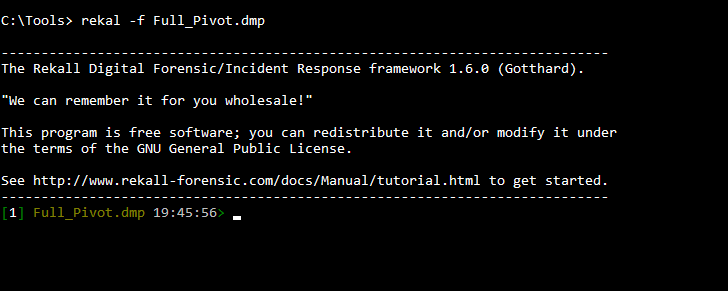
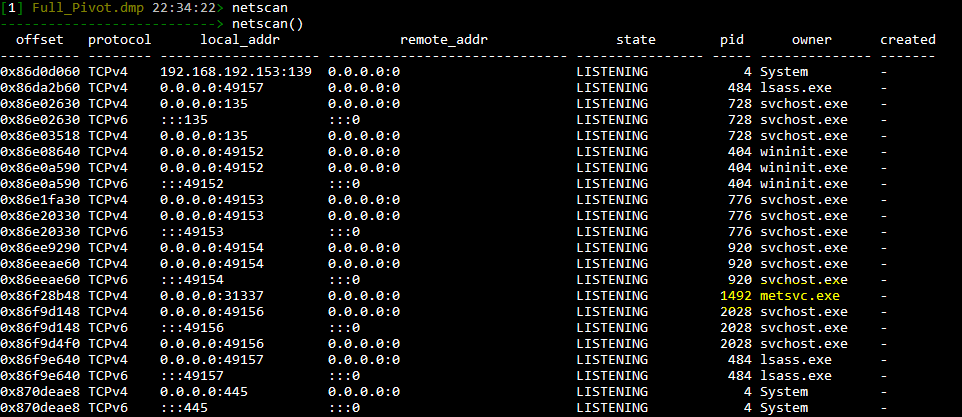
Next we run “Netscan” to observe all open network connections. Of course, we want to focus on the “ESTABLISHED” connections here.
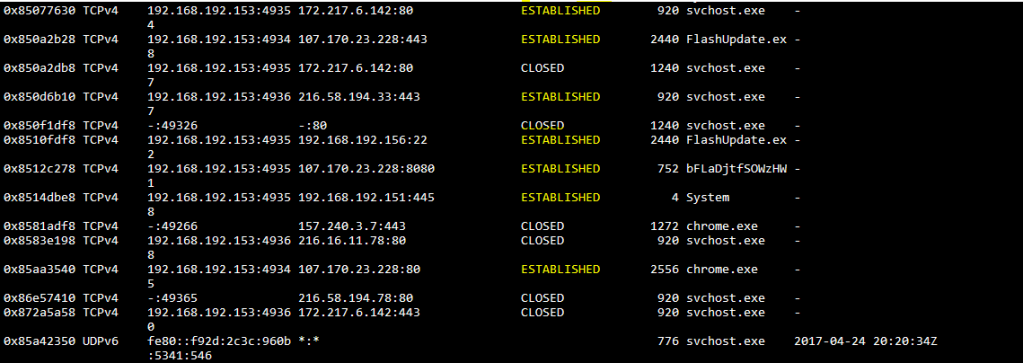
Boy, does “FlashUpdate.exe” and bFLaDjtfSOWzHW standout here…..
To dig deeper and understand the parent process ID’s and process names associated we must run “pslist”
[1] Full_Pivot.dmp 22:39:19> pslist
---------------------------> pslist()
_EPROCESS          name          pid   ppid  thread_count handle_count session_id wow64    process_create_time       process_exit_time
---------- -------------------- ----- ------ ------------ ------------ ---------- ------ ------------------------ ------------------------
0x84f4a7e0 System                   4      0           94          572          - False  2017-04-24 19:21:48Z     -
0x863a3d40 smss.exe               260      4            3           29          - False  2017-04-24 19:21:48Z     -
0x86b089d0 csrss.exe              352    336            9          497          0 False  2017-04-24 19:21:49Z     -
0x86d9e030 msdtc.exe              368    476           12          144          0 False  2017-04-24 19:21:54Z     -
0x86a8d978 wininit.exe            404    336            3           74          0 False  2017-04-24 19:21:49Z     -
0x86cb55b0 services.exe           476    404           11          217          0 False  2017-04-24 19:21:49Z     -
0x86ccd5b0 lsass.exe              484    404            7          606          0 False  2017-04-24 19:21:49Z     -
0x86cbb858 lsm.exe                492    404            9          149          0 False  2017-04-24 19:21:49Z     -
0x8581f320 chrome.exe             548   2556            6          151          1 False  2017-04-24 20:14:35Z     -
0x85b5c030 svchost.exe            608    476            9          324          0 False  2017-04-24 19:23:54Z     -
0x86dc9b90 svchost.exe            632    476           11          360          0 False  2017-04-24 19:21:50Z     -
0x86de3030 vmacthlp.exe           696    476            3           53          0 False  2017-04-24 19:21:50Z     -
0x86dfb390 svchost.exe            728    476            8          281          0 False  2017-04-24 19:21:50Z     -
0x86eb2c88 bFLaDjtfSOWzHW         752   2624            3          120          1 False  2017-04-24 20:16:50Z     -
0x86e0d940 svchost.exe            776    476           22          549          0 False  2017-04-24 19:21:50Z     -
0x86fcd030 csrss.exe              836   3352           11          308          1 False  2017-04-24 19:25:39Z     -
0x85a56160 vmtoolsd.exe           856   3632            6          174          1 False  2017-04-24 19:25:49Z     -
0x86e26438 svchost.exe            864    476           18          439          0 False  2017-04-24 19:21:50Z     -
0x86e44030 svchost.exe            920    476           47         1279          0 False  2017-04-24 19:21:50Z     -
0x86e7c578 svchost.exe           1096    476           16          676          0 False  2017-04-24 19:21:50Z     -
0x8504fd40 cmd.exe               1132   2440            1           26          1 False  2017-04-24 20:20:03Z     -
0x872be030 taskhost.exe          1160    476            7          185          1 False  2017-04-24 19:25:44Z     -
0x86ec5c88 svchost.exe           1240    476           17          394          0 False  2017-04-24 19:21:51Z     -
0x86dd5548 dwm.exe               1264    864            3           71          1 False  2017-04-24 19:25:48Z     -
0x850df4e8 chrome.exe            1272   2556            2           57          1 False  2017-04-24 20:14:35Z     -
0x85812030 audiodg.exe           1292    776            6          126          0 False  2017-04-24 20:22:26Z     -
0x86eeb7b0 spoolsv.exe           1336    476           14          339          0 False  2017-04-24 19:21:52Z     -
0x86f08030 svchost.exe           1372    476           19          320          0 False  2017-04-24 19:21:52Z     -
0x86f29d40 metsvc.exe            1492    476            3           39          0 False  2017-04-24 19:21:52Z     -
0x86f68190 VGAuthService.        1528    476            3           87          0 False  2017-04-24 19:21:52Z     -
0x86f8c4f8 vmtoolsd.exe          1580    476            8          320          0 False  2017-04-24 19:21:53Z     -
0x870e5d40 svchost.exe           1752    476            6           92          0 False  2017-04-24 19:21:53Z     -
0x86d19030 WmiPrvSE.exe          1900    632           10          195          0 False  2017-04-24 19:21:54Z     -
0x86d69030 dllhost.exe           1976    476           13          191          0 False  2017-04-24 19:21:54Z     -
0x86f99a68 svchost.exe           2028    476            5           99          0 False  2017-04-24 19:21:57Z     -
0x872b0cc0 cmd.exe               2104   3632            1           22          1 False  2017-04-24 20:22:28Z     -
0x87230030 conhost.exe           2132    836            1           33          1 False  2017-04-24 20:16:50Z     -
0x8719e768 sppsvc.exe            2152    476            4          161          0 False  2017-04-24 19:22:01Z     -
0x871db2e8 GoogleCrashHan        2384   2280            6           95          0 False  2017-04-24 19:22:03Z     -
0x850ec3b8 FlashUpdate.ex        2440   3632            5          170          1 False  2017-04-24 20:15:58Z     -
0x871f11a0 svchost.exe           2452    476           16          249          0 False  2017-04-24 19:22:03Z     -
0x87215030 chrome.exe            2556   3632           31          775          1 False  2017-04-24 20:14:35Z     -
0x87163970 cscript.exe           2624   2440            6          190          1 False  2017-04-24 20:16:50Z     -
0x86cbc030 conhost.exe           2652    836            2           47          1 False  2017-04-24 20:20:03Z     -
0x85b5a808 SearchIndexer.        2764    476           13          621          0 False  2017-04-24 19:22:33Z     -
0x8504a9c0 chrome.exe            2864   2556            7           72          1 False  2017-04-24 20:14:35Z     -
0x8597cd40 winlogon.exe          2944   3352            5          113          1 False  2017-04-24 19:25:39Z     -
0x85126638 chrome.exe            2984   2556           10          188          1 False  2017-04-24 20:14:50Z     -
0x872bd030 WmiPrvSE.exe          3112    632            8          202          0 False  2017-04-24 19:22:13Z     -
0x86d4d918 Tcpview.exe           3384   3632            6          196          1 False  2017-04-24 19:29:12Z     -
0x86ebdd40 conhost.exe           3396    836            2           52          1 False  2017-04-24 20:22:28Z     -
0x85aa1d40 explorer.exe          3632   1292           29          804          1 False  2017-04-24 19:25:48Z     -
0x871584d8 taskeng.exe           3644    920            6           82          0 False  2017-04-24 20:22:21Z     -
0x8623c2b8 winpmem_1.6.0.        3824   2104            1           21          1 False  2017-04-24 20:23:17Z     -
To answer question 1:
Active connections of note:
- svchost.exe
- FlashUpdate.exe
- bFLaDjtfSOWzHW
- Chrome.exe
- System 4
Next, running pstree we can pay attention to the parent ID to see what these are associated with.
Full_Pivot.dmp 22:34:55> pstree
---------------------------> pstree()
_EPROCESS                                 ppid  thd_count hnd_count       create_time
---------------------------------------- ------ --------- --------- ------------------------
  0x86fcd030 csrss.exe (836)               3352        11       308 2017-04-24 19:25:39Z
. 0x87230030 conhost.exe (2132)             836         1        33 2017-04-24 20:16:50Z
. 0x86cbc030 conhost.exe (2652)             836         2        47 2017-04-24 20:20:03Z
. 0x86ebdd40 conhost.exe (3396)             836         2        52 2017-04-24 20:22:28Z
  0x8597cd40 winlogon.exe (2944)           3352         5       113 2017-04-24 19:25:39Z
  0x84f4a7e0 System (4)                       0        94       572 2017-04-24 19:21:48Z
. 0x863a3d40 smss.exe (260)                   4         3        29 2017-04-24 19:21:48Z
  0x86b089d0 csrss.exe (352)                336         9       497 2017-04-24 19:21:49Z
  0x86a8d978 wininit.exe (404)              336         3        74 2017-04-24 19:21:49Z
. 0x86cb55b0 services.exe (476)             404        11       217 2017-04-24 19:21:49Z
.. 0x86d9e030 msdtc.exe (368)               476        12       144 2017-04-24 19:21:54Z
.. 0x85b5c030 svchost.exe (608)             476         9       324 2017-04-24 19:23:54Z
.. 0x86dc9b90 svchost.exe (632)             476        11       360 2017-04-24 19:21:50Z
... 0x86d19030 WmiPrvSE.exe (1900)          632        10       195 2017-04-24 19:21:54Z
... 0x872bd030 WmiPrvSE.exe (3112)          632         8       202 2017-04-24 19:22:13Z
.. 0x86de3030 vmacthlp.exe (696)            476         3        53 2017-04-24 19:21:50Z
.. 0x86dfb390 svchost.exe (728)             476         8       281 2017-04-24 19:21:50Z
.. 0x86e0d940 svchost.exe (776)             476        22       549 2017-04-24 19:21:50Z
... 0x85812030 audiodg.exe (1292)           776         6       126 2017-04-24 20:22:26Z
.... 0x85aa1d40 explorer.exe (3632)        1292        29       804 2017-04-24 19:25:48Z
..... 0x85a56160 vmtoolsd.exe (856)        3632         6       174 2017-04-24 19:25:49Z
..... 0x872b0cc0 cmd.exe (2104)            3632         1        22 2017-04-24 20:22:28Z
...... 0x8623c2b8 winpmem_1.6.0. (3824)    2104         1        21 2017-04-24 20:23:17Z
..... 0x850ec3b8 FlashUpdate.ex (2440)     3632         5       170 2017-04-24 20:15:58Z
...... 0x8504fd40 cmd.exe (1132)           2440         1        26 2017-04-24 20:20:03Z
...... 0x87163970 cscript.exe (2624)       2440         6       190 2017-04-24 20:16:50Z
....... 0x86eb2c88 bFLaDjtfSOWzHW (752)    2624         3       120 2017-04-24 20:16:50Z
..... 0x87215030 chrome.exe (2556)         3632        31       775 2017-04-24 20:14:35Z
...... 0x8581f320 chrome.exe (548)         2556         6       151 2017-04-24 20:14:35Z
...... 0x850df4e8 chrome.exe (1272)        2556         2        57 2017-04-24 20:14:35Z
...... 0x8504a9c0 chrome.exe (2864)        2556         7        72 2017-04-24 20:14:35Z
...... 0x85126638 chrome.exe (2984)        2556        10       188 2017-04-24 20:14:50Z
..... 0x86d4d918 Tcpview.exe (3384)        3632         6       196 2017-04-24 19:29:12Z
.. 0x86e26438 svchost.exe (864)             476        18       439 2017-04-24 19:21:50Z
... 0x86dd5548 dwm.exe (1264)               864         3        71 2017-04-24 19:25:48Z
.. 0x86e44030 svchost.exe (920)             476        47      1279 2017-04-24 19:21:50Z
... 0x871584d8 taskeng.exe (3644)           920         6        82 2017-04-24 20:22:21Z
.. 0x86e7c578 svchost.exe (1096)            476        16       676 2017-04-24 19:21:50Z
.. 0x872be030 taskhost.exe (1160)           476         7       185 2017-04-24 19:25:44Z
.. 0x86ec5c88 svchost.exe (1240)            476        17       394 2017-04-24 19:21:51Z
.. 0x86eeb7b0 spoolsv.exe (1336)            476        14       339 2017-04-24 19:21:52Z
.. 0x86f08030 svchost.exe (1372)            476        19       320 2017-04-24 19:21:52Z
.. 0x86f29d40 metsvc.exe (1492)             476         3        39 2017-04-24 19:21:52Z
.. 0x86f68190 VGAuthService. (1528)         476         3        87 2017-04-24 19:21:52Z
.. 0x86f8c4f8 vmtoolsd.exe (1580)           476         8       320 2017-04-24 19:21:53Z
.. 0x870e5d40 svchost.exe (1752)            476         6        92 2017-04-24 19:21:53Z
.. 0x86d69030 dllhost.exe (1976)            476        13       191 2017-04-24 19:21:54Z
.. 0x86f99a68 svchost.exe (2028)            476         5        99 2017-04-24 19:21:57Z
.. 0x8719e768 sppsvc.exe (2152)             476         4       161 2017-04-24 19:22:01Z
.. 0x871f11a0 svchost.exe (2452)            476        16       249 2017-04-24 19:22:03Z
.. 0x85b5a808 SearchIndexer. (2764)         476        13       621 2017-04-24 19:22:33Z
. 0x86ccd5b0 lsass.exe (484)                404         7       606 2017-04-24 19:21:49Z
. 0x86cbb858 lsm.exe (492)                  404         9       149 2017-04-24 19:21:49Z
  0x871db2e8 GoogleCrashHan (2384)         2280         6        95 2017-04-24 19:22:03Z
Here is initial flow of what I can see here associated:
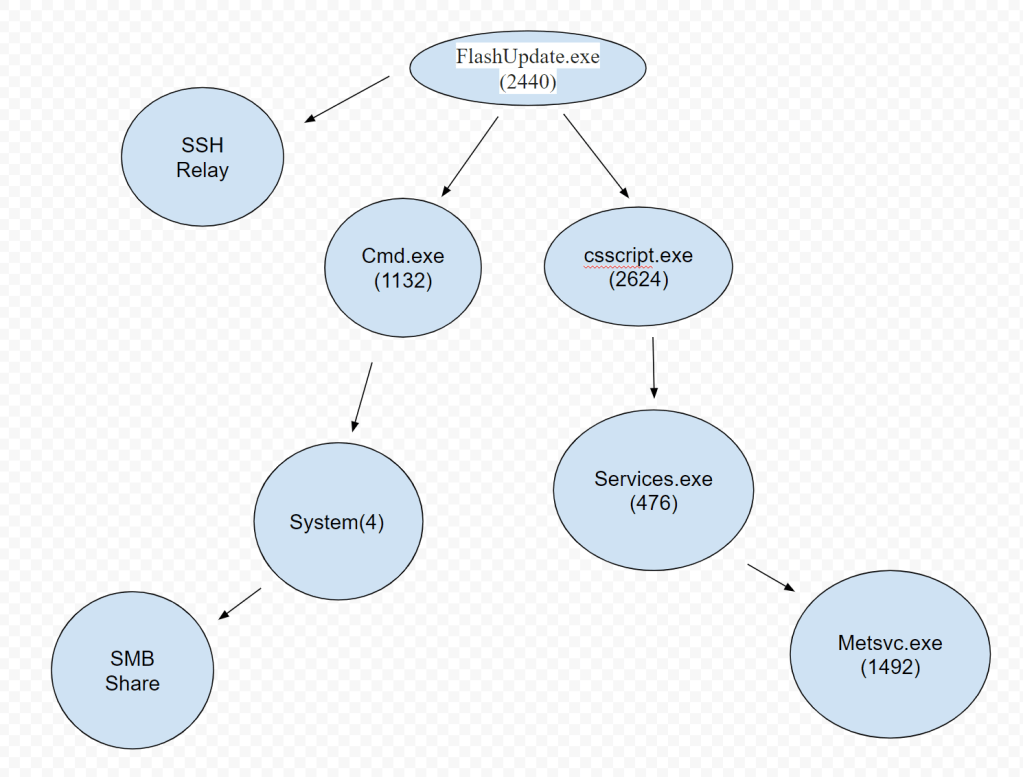
From my understanding, it looks like when the FlashUpdate.exe was downloaded, it initiated a few things as its attack: (Questions 2 and 3)
- A SSH connection to 192.168.192.156
- TCP 443 to 107.170.23.228 (Google Chrome)
- cmd.exe (1132) as an initial exploitation into the System(4) to SMB via port 445
- csscript.exe (246) was run to what looks to be a form of persistence and so the SSH can remain in place via the bFLaDjtfSOWzHW(752) that is associated with it.
- metsvc.exe(1492) remained open as a listening process with no DLL’s associated with it and what looks to be the main point of persistence.
And to finish, here is what is the IP mapping to understand more so what is connected to what here:
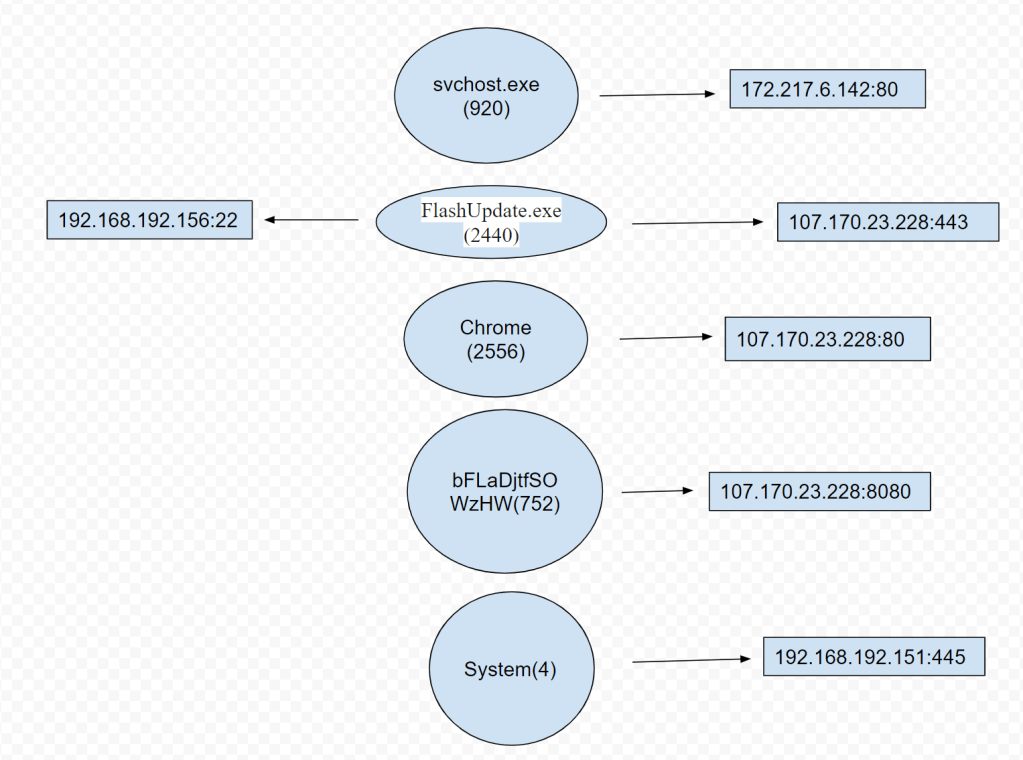
As we can see, there is a lot going on here and shows us the attackers means of exploitation. SSH, SMB, and Internet traffic were all abused here. The attacker had both an exploitation means via SMB and what looks like a persistence function via the metsvc.exe(1492) process that had no DLL’s associated as we would typically expect and was actively listening for connections.
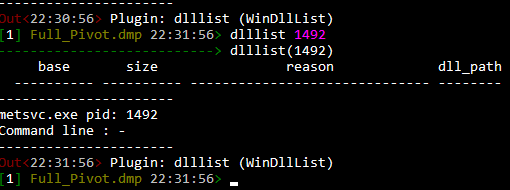
Searching for the metsvc.exe(1492) process could be the tell tell sign of a comprised machine and would be a top priority action in searching the rest of the network associated with the original device found to be exploited.
The importance of memory forensics in cyber security cannot be understated. Since any attack has to leave a trail in memory in some form or fashion, knowing how to dissect a memory image is the art to the science of being a top tier security professional.
I hope you got a good sense of what this tool can do with this example DMP file I looked at. There is a lot more to be done with this tool, please see Rekall’s site on some functional options available:
http://www.rekall-forensic.com/documentation-1/rekall-documentation/tutorial
 morrisettsecurity.com